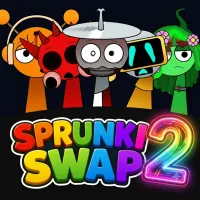
Sprunki Swap 2






Sprunki Swap 2
Sprunki Swap 2 is a music-mixing game that reimagines familiar Sprunki characters with altered designs and sound patterns. Build your own track by combining different performers, layering audio loops, and testing unexpected musical pairings. Play Sprunki Swap 2 online and experiment with new sounds at your own pace.
HOW TO PLAY SPRUNKI SWAP 2
Sprunki Swap 2 uses a simple drag-and-drop system that lets you create music without formal musical training. Each character contributes a particular sound, so your choices determine how the final composition develops. Instead of following a fixed sequence, experiment with different combinations to find a mix that suits your taste.
Choose Characters with Swapped Sounds
Start by exploring the available character lineup. Unlike the original Sprunki experience, this mod features reimagined characters with altered appearances and remixed audio. Familiar designs may represent different musical roles, so do not assume every character sounds the way you expect.
Listen to the available sounds and choose performers that match the style you want to create. Trying unfamiliar characters can lead to combinations you might otherwise overlook.
Drag Characters onto the Stage
Select a sound icon and drag it onto an available character slot to activate its audio loop. Each performer adds another element to your composition, allowing you to build a track gradually.
Begin with a few characters rather than filling every slot immediately. This makes it easier to hear what each sound contributes before introducing more layers.
Mix Sound Loops to Create Your Track
Combine different sounds to shape the rhythm and mood of your music. Start with a steady beat, then add melodic elements, vocals, or sound effects when they are available. Pay attention to how the loops work together instead of selecting characters based on appearance alone.
If the result feels too crowded, remove or replace a character and listen again. Repeating this process helps you discover combinations that sound balanced and distinctive.
Controls
- Mouse Click: Select sound icons or interact with characters.
- Drag and Drop: Place characters onto the stage to activate their sounds.
- Click and Remove: Change an active character or adjust your mix, depending on the available interface.
Tips for Creating Better Mixes
- Add sounds one at a time so you can identify their individual contributions.
- Build a rhythm before introducing extra musical layers.
- Try unexpected character combinations to explore different sound patterns.
- Replace sounds that compete with each other instead of adding more performers.
- Replay your composition after each change to compare the results.
RELATED GAMES