FNAF Ultimate Custom Night








FNAF Ultimate Custom Night
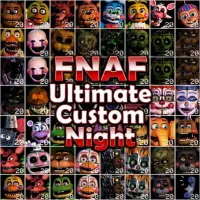
FNAF Ultimate Custom Night is a survival horror game that brings 50 animatronics from across the FNAF series into one customizable night. Choose your opponents, set their AI levels, and prepare your office before trying to survive until 6 AM. You can play UCN online directly in your browser without downloading anything.
What's Included in FNAF Ultimate Custom Night?
This fan-made browser version combines familiar characters with different survival mechanics. Instead of following a fixed series of nights, you decide how difficult each session will be.
- 50 animatronics: Choose characters from FNAF 1 through FNAF 6 and FNAF World, with AI levels ranging from 0 to 20.
- 16 challenges: Try preset character combinations such as Bears Attack, Ladies Night, Creepy Crawlies, and Chaos.
- Four offices: Unlock three additional office layouts by reaching high scores of 2,000, 5,000, and 8,000.
- Four power-ups: Use Frigid, 3 Coins, Battery, or DD Repel to prepare for a night.
- Faz-Coins and rewards: Collect coins to purchase character plushies or a Death Coin from the Prize Counter.
- Hidden encounters: Dee Dee can introduce unexpected opponents, while rare events add extra surprises.
Each night runs from 12 AM to 6 AM and lasts 4 minutes and 30 seconds. Your score is calculated by multiplying the combined AI levels of the 50 characters by 10, with a maximum of 10,000 points.
FNAF ULTIMATE CUSTOM NIGHT GAMEPLAY AND SURVIVAL BASICS
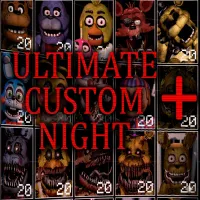
Start by selecting animatronics from the character grid and adjusting their AI levels. An AI level of 0 keeps a character inactive, while higher levels make active characters attack more often and leave you less time to react. Beginners can start with a few opponents at low difficulty before building a more demanding lineup.
Once you enter the office, your goal is to manage several threats at once. Use the doors to block hallway attackers, close the vents when necessary, check cameras, and monitor the office temperature, noise, and power usage. You can also switch between different devices, including the Heater, Power A/C, Power Generator, Silent Ventilation, and Global Music Box.
Every animatronic has its own behavior, so learning the correct response is essential. Some require a mask, others must be stopped through the camera or ventilation systems, and several depend on sound cues. Keeping your volume at a level where you can hear these warnings will help you react in time.
All 50 Animatronics and How to Stop Them
The character roster combines enemies from several FNAF games, but not all of them use the same attack pattern. Here are some important examples:
FNAF 1
- Freddy Fazbear: Watch the cameras and close the left door when he reaches it. Higher office temperatures make him move faster.
- Bonnie: Avoid watching him on the camera while he is at Pirate's Cove, and check the small desk figurine to identify who is there.
- Chica: Change the kitchen music when the pots and pans stop making noise.
- Foxy: Check Pirate's Cove regularly to prevent him from entering the office.
FNAF 2
- Toy Bonnie and Toy Chica: Put on the Freddy mask quickly when they enter the office.
- Mangle and Withered Chica: Use the vent-snare before they reach the ventilation opening.
- Marionette: Keep the music box wound through CAM 4 or use the Global Music Box.
- Golden Freddy: Put on the mask or open the monitor quickly when he appears.
FNAF 3 and FNAF 4
- Springtrap: Watch for him approaching the front vent and close it when he appears.
- Phantom Freddy: Shine the flashlight on him before he fully appears.
- Nightmare Freddy: Use the flashlight to clear the Freddles before Nightmare Freddy arrives.
- Nightmare Fredbear and Nightmare: Close the appropriate door when either appears at the hallway entrance.
- Nightmarionne: Avoid leaving the cursor over him for too long.
Sister Location and FNAF 6
- Ballora: Listen for her music and close the door on the side where it is heard.
- Funtime Foxy: Check the showtime on CAM 6 and keep the camera open at the required time.
- Ennard: Listen for metallic scraping and close the front vent when you hear it.
- Happy Frog and other duct enemies: Use the audio lure or Heater when effective against the specific character.
- Music Man: Keep noise under control to avoid triggering his attack.
- Scrap Baby: Use the controlled shock when she moves.
- Lefty: Reduce noise and heat, and use the Global Music Box to calm him.
The full menu features FNAF all characters with 50 character portraits, but only 49 are active in UCN in browser. Rockstar Foxy does not appear during the night, even when selected.
Secrets: Dee Dee, XOR, and Old Man Consequences
Dee Dee can appear during a night and add another character to your lineup, including one of six opponents that are not available in the main selection menu:
- RXQ: Causes the office to flicker before going completely dark for 20 seconds.
- Plushtrap: Appears on CAM 6 and must be watched until he sits down.
- Nightmare Chica: Requires the Power A/C to push back her closing jaws.
- Bonnet: Runs across the screen and must be stopped by clicking her nose.
- Minireenas: Gradually obstruct the monitor if it remains open too long.
- Lolbit: Displays "PLEASE STAND BY" until you type L, O, and L.
XOR is an extremely rare version of Dee Dee. She can appear randomly or show up in a 10,000-point run, then introduce all six hidden characters after three minutes.
Controls
- Look left or right: Move the mouse to the screen edge.
- Left / right doors: Press A / D or use the L / R buttons.
- Front / side vents: Press W / F or use the vent buttons.
- Fan: Press Space or tap the fan button.
- Open monitor: Press S or tap the monitor bar.
- Flashlight: Hold Z or tap the flashlight button.
- Select devices: Press 1–5; press 6 or X to turn all devices off.
- Catch Old Man Consequences' fish: Press C or tap the fishing pond.
- Return to menu: Hold Esc or hold the upper-right arrow.
SIMILAR HORROR SURVIVAL GAMES YOU SHOULD TRY
Experience intense horror survival with fixed viewpoints, smart resource management, and deadly animatronics in 5 Nights with Flumpty 2, Bizarre Custom Night, and FNAF: Night at Foxy's.
Five Nights at Freddy's and Ultimate Custom Night are trademarks of Scott Cawthon. This is a fan-made browser version, not affiliated with or endorsed by Scott Cawthon.
Frequently Asked Questions
How many characters are in Ultimate Custom Night?
The selection menu contains 50 animatronics, each with an AI setting from 0 to 20. In this browser version, 49 characters are active during the night because Rockstar Foxy does not appear.
How long does one UCN night last?
A complete night lasts 4 minutes and 30 seconds. Each in-game hour takes 45 seconds, from 12 AM until 6 AM.
What is 50/20 mode?
50/20 mode means setting all 50 characters to AI level 20. The setup is worth 10,000 points, and the game saves your longest survival time in this mode.
Does UCN save progress?
Yes. The browser saves your high score, longest 50/20 survival time, challenge stars, collected power-ups, and unlocked offices. Clearing browser data or using private browsing can cause this progress to be lost.
Can I play Ultimate Custom Night on mobile?
Do I need to download UCN?
No. You can play UCN in your browser without downloading or installing the game.
Is Ultimate Custom Night multiplayer?
No. This version is a single-player survival experience.